
01 — Context
A one-step request that was really a whole-journey problem.
Stakeholders asked for one new step: after engineers create the engineering design package (EDP), push it to provisioning, run validations and generate configs before anyone raises tickets.
When I dug into the existing tool, the missing step wasn’t the real issue. Migrating ports to new hardware was a long, multi-team process spread across disconnected screens. Engineers got through it on memory and read system state from disabled buttons.
02 — Problem
Status was everywhere, so it was nowhere.
Migrations are high-stakes and effectively irreversible, yet the legacy flow worked against the engineer at every turn:
No preview: an irreversible action sat behind a “Click to Migrate” button whose only warning was “this action is irreversible.”
Dead-end waits: validation ran for 10+ minutes behind “check back in 10 mins”, and nothing told you when it finished.
Readiness in prose: disabled buttons came with paragraphs explaining what would unlock them.
Status in four places: dashboard columns, a side panel, page metrics and footer buttons, with no single answer to “where am I, and what’s next?”

Fig. 01
Before — the legacy launched-site dashboard. ① An irreversible “Click to Migrate” action with no preview ② Status split across five columns ③ Every row reads “In Progress”, so nothing says whose move it is
03 — Research
Encode the sequence people were already memorizing.
I took apart every legacy screen and mapped each stage: who owns it, what gates it, and where people get stuck. The stages engineers had learned by heart became explicit steps in a six-step wizard: setup and launch, system checks, EDP design, reservation, validate and configure, then tickets.
I worked in grayscale first on purpose. Deciding what’s a step, what runs in parallel and what gates what is far cheaper to get right before pixels.
04 — Key decisions
Four choices that shaped the wizard.
I reframed the brief from “add a screen” to “give the whole journey a shape engineers can trust,” then made four decisions that carried the design.
Decision 01
A wizard, not a bolted-on screen
Why
The process was already a sequence of gated stages, and a stepper’s built-in locking matched how the work actually flowed.
Tradeoff
More structure up front. Every step is deep-linkable and resumable, so power users running many sites aren’t slowed down.
Decision 02
Retry only what failed
Why
The hard requirement was “never make them restart.” Passed checks keep their green state, so progress feels cumulative, not reset.
Tradeoff
Escalation to support appears only after a failed retry, which adds one step before engineers get help.
Decision 03
Pull downport review out of the wizard
Why
Stakeholder review showed it’s owned by another team and runs on its own timeline. It became a parallel track that still gates EDP design.
Tradeoff
A less tidy linear story, in exchange for one that matches how the work really happens.
Decision 04
Every locked button names its unlock
Why
Engineers were reading paragraphs to learn why they were stuck. Now each locked button carries a caption: “Enables when all 12 checks pass.”
Tradeoff
One more line of UI under every gate.

Fig. 02
Before — readiness explained in prose. ① “View EDP Details” is disabled ② A numbered paragraph explains what unlocks it ③ “Proceed” is disabled with no reason given

Fig. 03
After — the validation hub. Every check in one place; a failed check expands in place with the error, the affected ports and its own retry, and the locked button says exactly what enables it.
05 — Solution
Built for long waits, careful edits and system drift.
Validation was the core ask, but the same situations recur across the whole flow: something is running, something failed, a gate is closed, state needs confirming. I designed each one once as a reusable pattern, so engineers learn it once and the system reads as one coherent thing.

Fig. 04
Safe to leave — live progress, elapsed against typical time, and a notification when it’s your turn. The same pattern repeats five times across the flow.

Fig. 05
Configs you can trust and change — grouped by port and file type, every edit saved as a new version with who and when, with diff and restore.
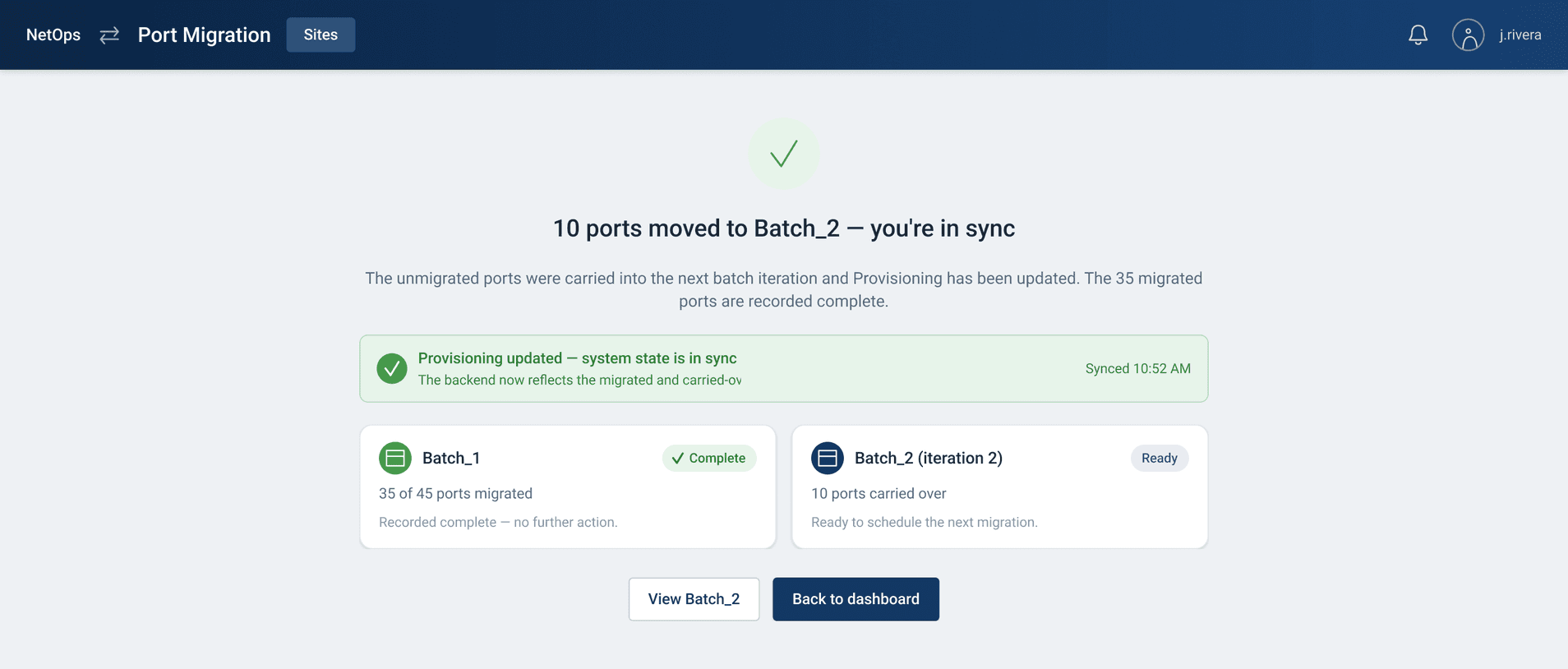
Fig. 06
“In sync” — after a batch runs, ports that didn’t migrate carry into the next batch, and an explicit confirmation closes the loop.
06 — Outcome
Shipping in phases.
Engineering is building the wizard in phases, starting with validate and configure, then post-migration reconciliation. Both phases plug into the live tool through a single entry point and reuse the redesigned screens downstream.
Because the async progress, cumulative retry and visible-gate patterns were designed once, each phase ships already consistent with the next.
07 — Reflection
Designing for trust.
The recurring question was never “what does this screen look like?” It was “does the engineer believe the system is in the state the UI claims?” Visible gates, honest progress, cumulative retries and explicit sync confirmations did more for usability than any single layout.
The other lesson was sizing the problem. The brief asked for one step; the right response was to reframe the whole journey, then let the structure follow how the work really happens.
Next, I’d add email deep-links for the long waits, run a usability pass with engineers on real migrations, and measure retry rates and time-to-complete against the legacy flow.
